Using AI for Engineering Learning: A Personal Tutor in 5 Steps
AI won’t replace humans, but humans who use AI will replace those who don’t by OpenAI CEO Sam Altman
Artificial intelligence is everywhere right now. It is in the news, in your LinkedIn feed, and there is a good chance it is sitting unread in a dozen newsletters in your inbox. For engineers, the noise around AI can feel overwhelming — and easy to dismiss, so using AI for engineering learning isn’t the obvious choice for many.
But here is the thing: AI is a tool. Like CAD, CAM, Mathcad, or a vernier calliper, it does not replace engineering judgement. It augments it. The engineers who will get the most from this era are the ones who learn how to use it deliberately — not the ones who wait to see what happens.
I have been using AI tools — specifically large language models (LLMs) — for the last three years. ChatGPT, Claude, Perplexity, and Microsoft Copilot at work have all found their way into my daily workflow. I have used them as a calculator, a coding assistant, an editor, a design sounding board, and an engineering thinking partner. Over time, using AI for engineering learning and professional development has become as natural as reaching for a handbook — and considerably more interactive.
This post is about one specific application I designed recently that has genuinely changed how I approach study: a personal tutor system built entirely inside an AI tool. It is simple to set up, grounded in how memory and learning actually work, and you can have it running within an hour.
Why AI Works for Engineering Learning
Before the steps, it is worth understanding why this approach is effective — because it is not simply about convenience.
The method is built on three evidence-based learning techniques:
- Active recall — retrieving information from memory rather than passively re-reading it. Research consistently shows this strengthens retention more effectively than highlighting or note-taking alone.
- Spaced repetition — revisiting material at increasing intervals over time, targeting the point just before you would forget it. This is the principle behind tools like Anki.
- Interleaving — mixing topics during study sessions rather than blocking one subject at a time. Counter-intuitive but well-supported: interleaved practice produces better long-term retention and transfer of knowledge than blocked practice.
An AI tutor, given the right prompt, can apply all three of these simultaneously — something a static textbook or a pre-recorded video course cannot do. It adapts to your responses, identifies your gaps, and adjusts the difficulty of questioning in real time. That is what makes using AI for engineering learning qualitatively different from a search engine or a passive resource.
My Setup — A Systems Engineering Course
At work, I enrolled on a Systems Engineering course. The content is primarily delivered by students — each person takes a session — with foundational lessons from the tutor and standard course material available to download. Sessions are delivered online via Microsoft Teams and recorded, which means I have access to transcripts.
That transcript — combined with the course material — is what I feed into the AI. What comes back is a structured, interactive study environment built entirely around the content I am actually being assessed on. Not generic revision. My revision.
Here is exactly how I set it up.
Step 1 — Get Your Lesson Into a Format the AI Can Use
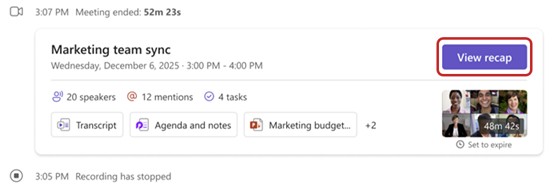
If your course is delivered online via Teams or a similar platform, ensure sessions are being recorded. Most platforms generate a transcript automatically — download it after each session.
If you are attending in person or recordings are not available, write your own notes during or immediately after the lesson. When using AI for engineering learning, the quality of the output is directly proportional to the quality of the content you feed in — so take this step seriously.
Once you have your transcript or notes, paste them into your AI tool of choice followed by Prompt 1. This prompt converts raw lesson content into clean, structured study notes.
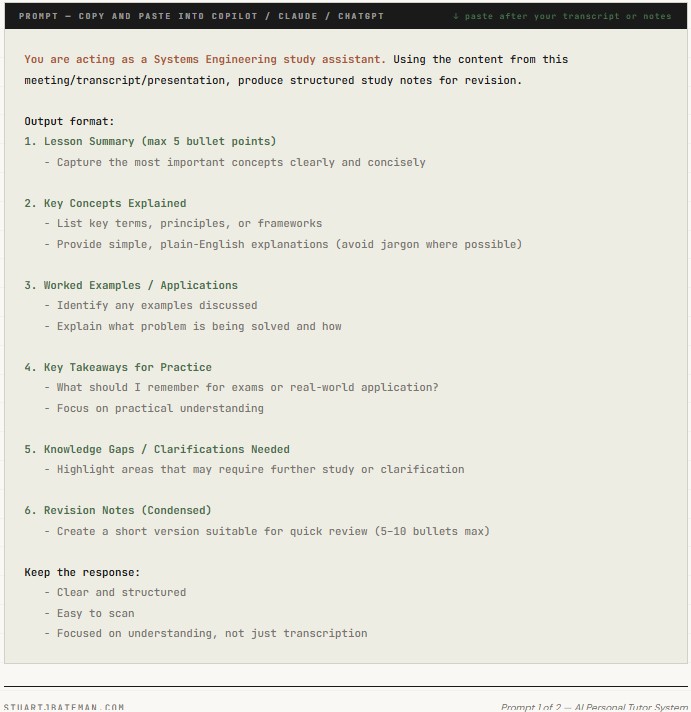
The output from this prompt becomes your lesson page — the structured content you carry forward into the steps that follow.
Step 2 — Create a Dedicated Notebook in Your AI Tool
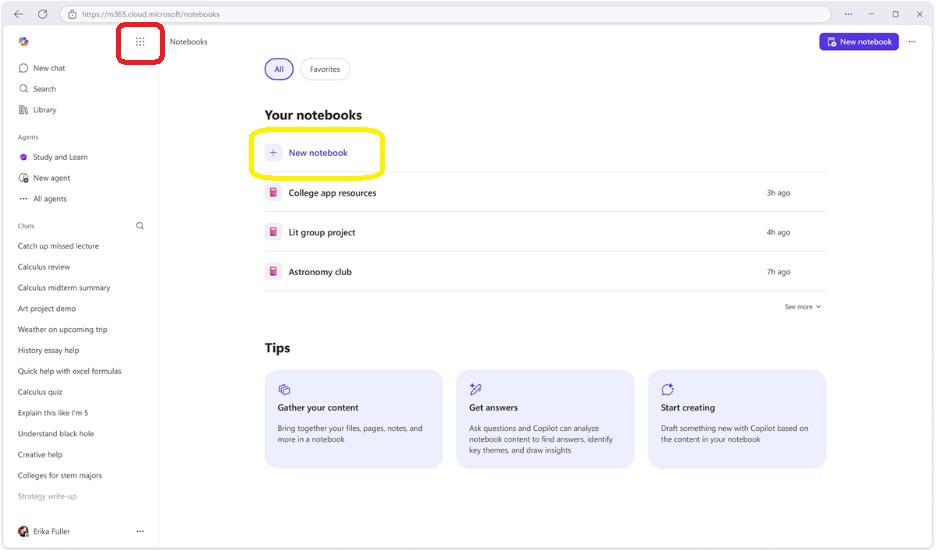
Open Microsoft Copilot and create a new Notebook. Name it something specific to your course — for example: “Systems Engineering Personal Tutor.”
The Notebook feature in Copilot is the key to this approach. Unlike a standard chat session, a Notebook maintains context across your interactions — it holds your reference material and your lesson pages together in one place, and the AI draws on all of it when you ask questions or run a study session.
If you are using Claude, the equivalent is a Project — which works on the same principle of persistent, scoped context. Other tools such as Perplexity and NotebookLM offer similar functionality. The specific platform matters less than the principle: you need a persistent, isolated environment for your course material, separate from your general AI usage.
Step 3 — Add Your Course Material as Reference Content
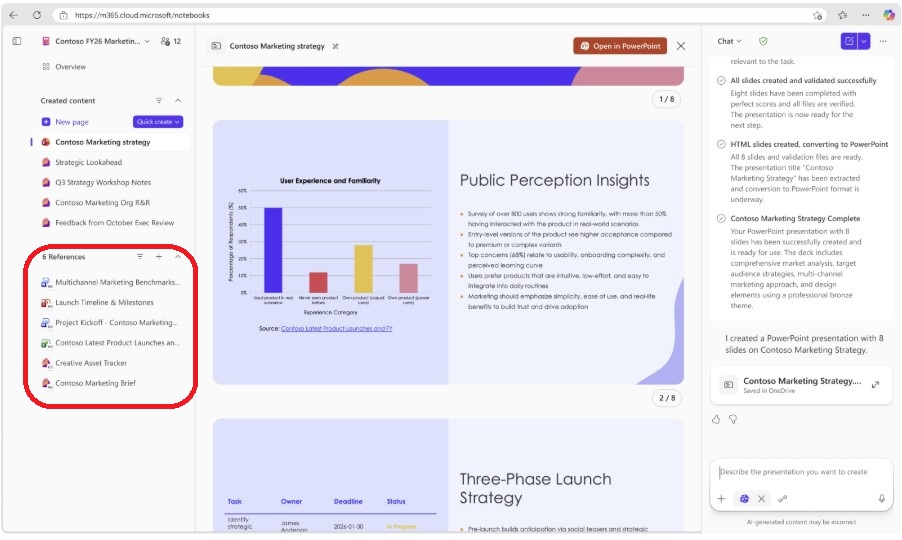
In the reference section of your Notebook, add everything relevant to your course:
- Downloaded course material and lecture slides
- Recommended textbooks or chapters
- Relevant websites and URLs — most platforms accept direct links
- Any standards documents or framework references relevant to your subject
The more relevant, high-quality material you add here, the richer the context the AI has to draw on. Think of this as building the knowledge base your personal tutor will teach from. Keep this Notebook specific to one course — do not mix unrelated subjects. The interleaving benefit works best when the AI draws connections between related topics within the same discipline.
Step 4 — Add Your Lesson Notes as Individual Pages
After each session, take the structured notes generated by Prompt 1 and add them as a new page within your Notebook. In Copilot, use the Add Page Content function and paste in the lesson notes.
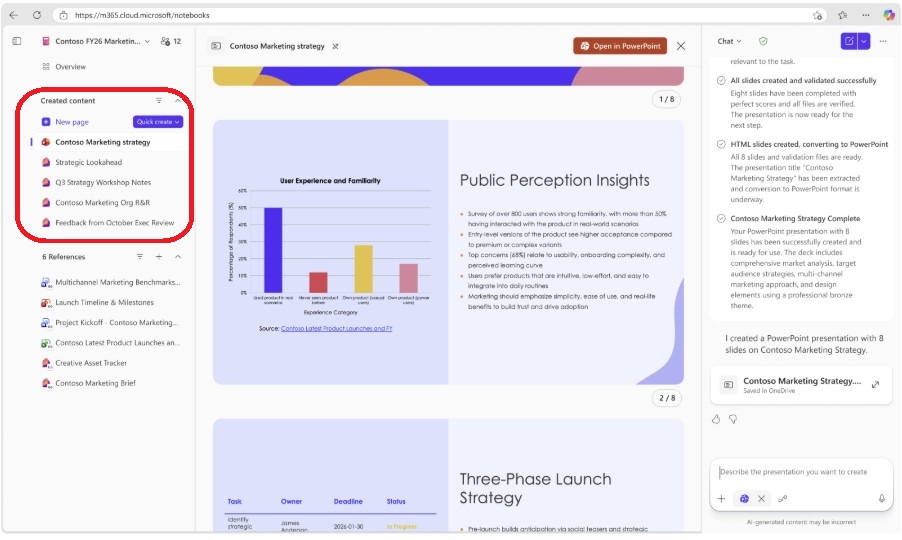
Build this up after every session — one page per lesson. Over the duration of the course, this becomes a complete, structured record of everything covered, in a format the AI can interrogate, cross-reference, and use to generate questions.
This is the cumulative asset that makes the system increasingly powerful as the course progresses. Early on, the AI has limited material to draw on. By week eight or ten, it has the full body of the course and can begin making connections between early and later content — which is precisely where interleaving delivers its benefit. This is using AI for engineering learning in a compounding way: each lesson you add increases the quality of every future study session.
Step 5 — Run Your Study Session Using AI for Engineering Learning
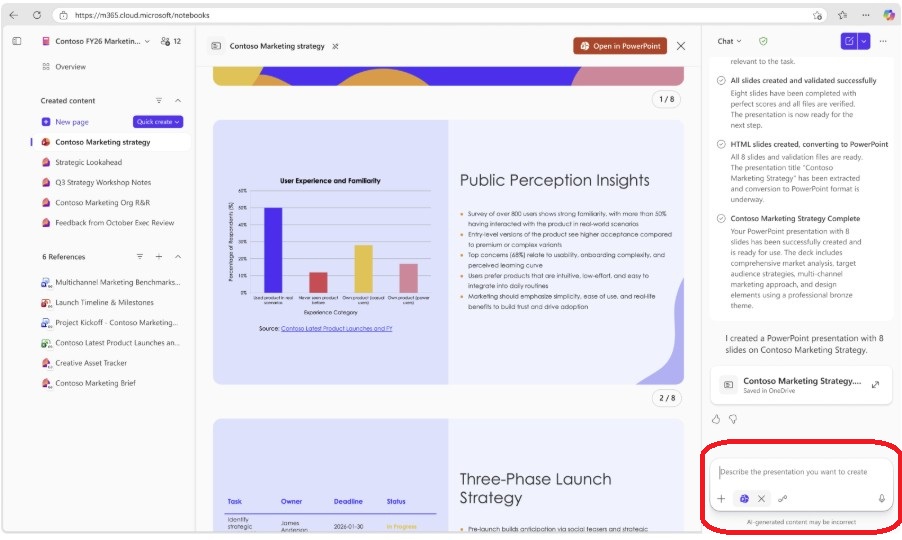
With your reference material and lesson pages in place, you are ready to use the notebook as an active study tool. Run Prompt 2 at the start of each study session. This prompt applies active recall, difficulty progression, interleaving, and spaced repetition in a single structured session.
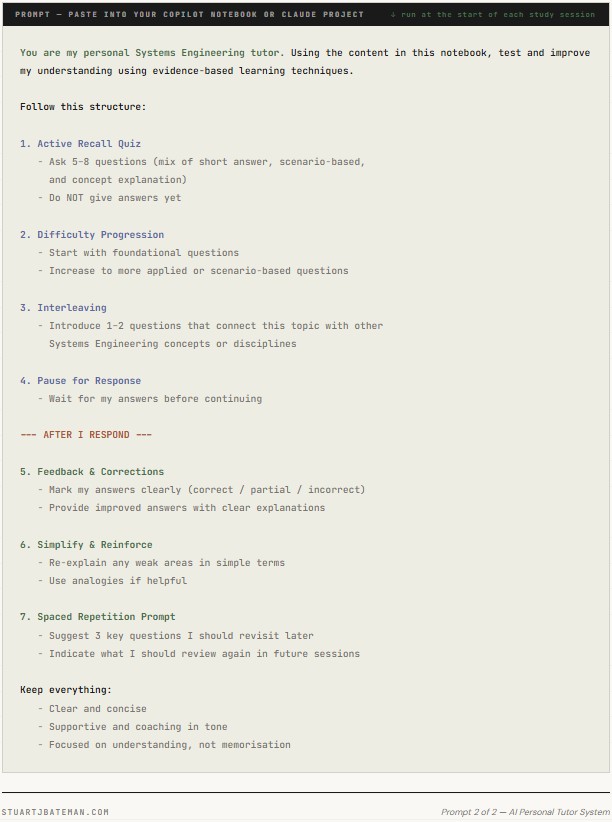
Answer the questions as honestly as you can — do not look up the answers before responding. The value is in the retrieval attempt, not the score. The AI will mark your responses, explain what you got wrong, and flag the gaps you need to revisit. Run this after every two or three new lessons to keep the spaced repetition working as intended.
A Note on AI as an Engineering Tool
I am not one for waiting for Skynet to arrive. AI — specifically LLMs — is another tool in the engineer’s kit. Like the PC, the mobile phone, or the scientific calculator before it, it will change how we work. The mobile phone changed language through texting; AI will likely do something similar to productivity and learning.
The engineers who thrive in this environment will not be the ones who know the most — they will be the ones who learn fastest and apply most effectively. Using AI for engineering learning is one of the clearest, most immediate ways to build that edge right now.
If you want to build on this further, the UK Government has invested significantly in free AI upskilling resources, available to all through their Skills for Jobs programme — details and course access can be found at gov.uk. Future posts on this site will cover more of what I have built and tested — including AI-assisted coding, automation tools, and practical workflow applications for engineers.
Key Takeaways
- AI tools are most powerful when used deliberately and with a clear method — not as a general search engine
- Using AI for engineering learning works because it applies three evidence-based techniques simultaneously: active recall, spaced repetition, and interleaving
- Prompt 1 converts raw lesson content — transcripts or notes — into structured, revision-ready study material
- Prompt 2 turns that material into an interactive, adaptive study session that tests, corrects, and flags gaps
- The system compounds in value as you add lesson pages — by the end of a course the AI has full context to draw connections across the whole subject
- Platform choice matters less than the principle: use a persistent, scoped environment — Copilot Notebook, Claude Project, or equivalent — and keep it specific to one course
Frequently Asked Questions
- Do I need a paid AI subscription for using AI for engineering learning this way? The Copilot Notebook feature requires a Microsoft 365 Copilot licence. Claude Projects and similar persistent context features are available on paid tiers of Claude and other platforms. A free-tier workaround is to paste your reference material and lesson notes into each session manually — less convenient, but the prompts work identically.
- Can I use this for engineering subjects other than Systems Engineering? Yes. Both prompts are written for Systems Engineering but are easily adapted — replace “Systems Engineering” with your subject throughout. The underlying method applies to any technical discipline.
- How is this different from just asking ChatGPT a question? A standard chat session has no persistent memory of your course material and no structure around how it questions you. The Notebook or Project approach gives the AI the full context of your course, and Prompt 2 structures the session around learning science rather than information retrieval. The difference in output quality is significant.
- What if the AI gets something wrong? LLMs can and do make errors — particularly on niche technical subjects. Cross-reference any answer you are uncertain about against your course material or a primary source. The AI is a study partner, not an examiner. Treat it accordingly.
- Is this approach suitable for professional development as well as formal courses? Yes. The same setup works for self-directed study — feed in relevant papers, standards documents, or technical references instead of course material, and use the same prompts. The active recall and spaced repetition benefits apply regardless of whether there is a formal assessment at the end.
References & Further Reading
- UK Government AI Skills Programme — free training for up to 10 million workers by 2030: gov.uk
- Microsoft Copilot Notebook — copilot.microsoft.com
- Anthropic Claude Projects — claude.ai
Resources – Internal Engineering Projects
Every engineer needs the best start in their career, and even if you’re a seasoned professional, continuous learning remains essential. Here’s a curated list of my engineering project posts designed for students and engineers at any stage who want to expand their skill set. Whether you’re looking to improve your practical experience, develop existing abilities, master new techniques, or simply tackle an exciting challenge, these projects offer something valuable for everyone in the engineering community.
Exciting Personal Project ideas for Mechanical Engineering Students to Tackle Year-Round
Discover eight hands-on project ideas that help mechanical engineering students build practical skills year-round, from 3D printing and CAD design to welding, coding, and Formula Student racing. Each project develops real-world engineering capabilities while keeping you engaged and continuously learning outside the classroom.
Top 6 3D Mechanical Engineering Projects to Develop Your Skills and Knowledge Now
Explore six practical 3D printing projects that teach essential mechanical engineering skills including compliant mechanisms, cam design, tolerance control, and Design for Manufacture and Assembly (DFMA). Each project offers hands-on learning opportunities to develop your CAD skills, understand material behaviour, and master reverse engineering—all from your home workshop.


What are your thoughts? Have I covered everything or is there more you know and would like to share?
I’m always learning and improving this site and my blogs, so please feel free to get in touch with me via LinkedIn or this site to discuss any topics I have covered.
If you’re having trouble finding ways to progress check out these sites filled with free learning tools:


Discover more from The Chartered Engineer
Subscribe to get the latest posts sent to your email.
